Steps
- 1
Plug in and open the USB notification
Pull down the notification shade and tap the notification about USB (Charging this device via USB, or similar).
- 2
Choose File transfer
Under Use USB for, choose File transfer (some phones say File transfer / Android Auto).
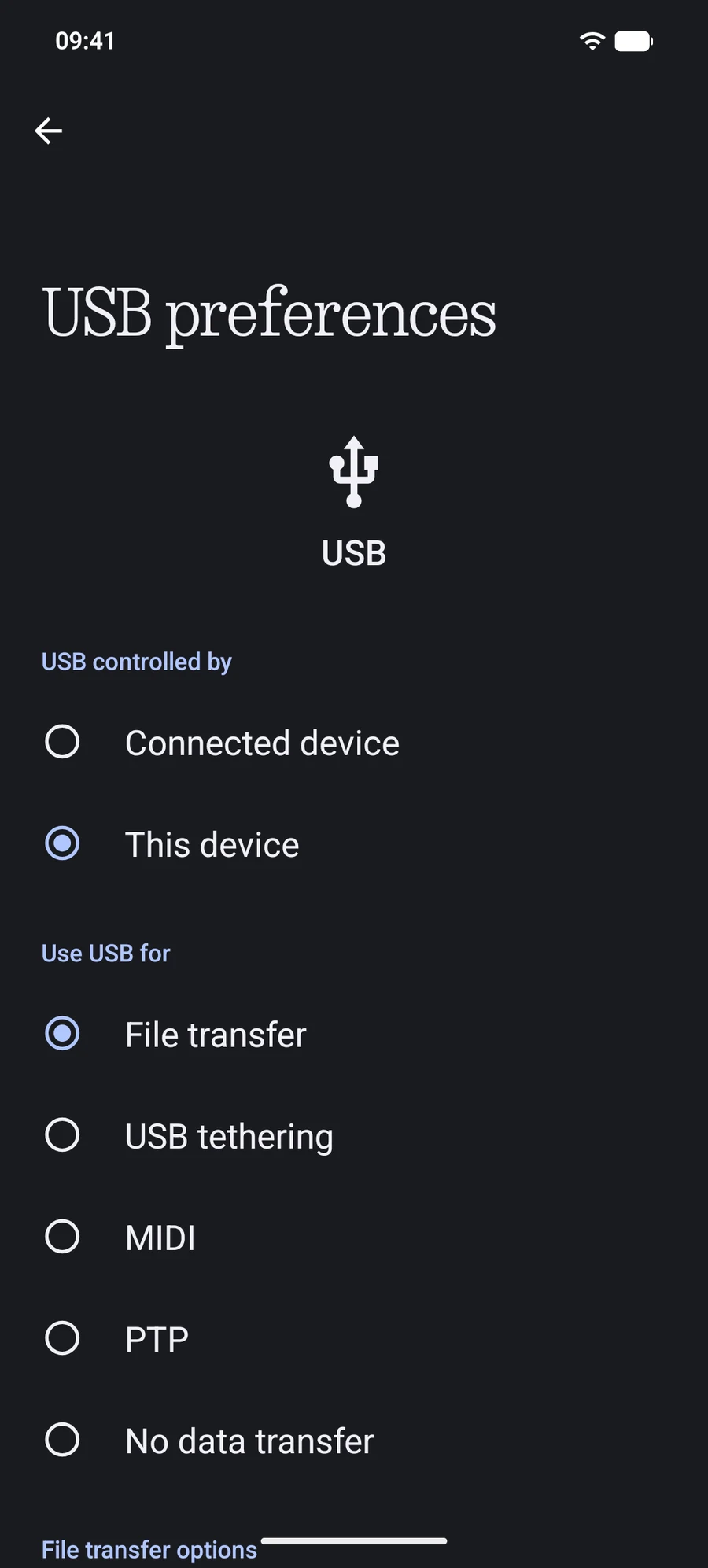
- 3
Open it in Finder
In PortLine, choose Standard USB for the phone or leave Automatic on, then click Open in Finder.
Why a Mac doesn't show MTP phones by itself
Windows has MTP built in; macOS doesn't. Image Capture can import camera photos from phones in PTP mode, but nothing in macOS browses a phone's folders. PortLine adds that to Finder.
What PortLine adds on top of MTP
- File identities that survive renames and moves, so Finder never loses track of a file
- Thumbnails the phone already has, shown without downloading photos
- One request at a time to the phone, scheduled so that what you open goes first
Questions
Is MTP slower than USB debugging?
Usually somewhat: on our test phone, MTP read 50 files of 4 MiB at 26 to 29 MB/s. Advanced USB, over USB debugging, is PortLine's fastest connection.
Related guides
Guide · 3 min readHow to enable USB debugging on AndroidTurn on Developer options and USB debugging on Samsung, Pixel, Xiaomi, OnePlus, Nothing and other Android phones, and approve your Mac safely.Guide · 4 min readAndroid phone not showing up on Mac: what to checkPhone not appearing on your Mac? Check the cable, USB mode, lock screen, USB debugging approval, other apps holding the phone, Finder settings and Wi-Fi.